Twitch TTS with Cheers, Channel Points and Power-ups
Understand how viewers send VoicePuppet messages with Cheers, Channel Points, resubs and custom Twitch Power-ups.
Choose how chat sends TTS
VoicePuppet can speak messages from several Twitch features. The broadcaster chooses which ones to enable. These are different ways to send a message, with different voice access rules.
| Way to send | How it works |
|---|---|
| Cheers | Each voice has a Bits price. The Cheer must cover the selected voice and message. |
| Channel Points | The channel selects a TTS reward. A viewer redeems that reward with their message. |
| Resubs | The resub message can speak when the channel enables sub alerts. Voice access can depend on the subscription tier. |
| Custom Power-ups | Enabled Power-ups with viewer text can speak. Their Bits cost determines voice access in the same way as a Cheer. |
Build a message as a viewer
- Open the broadcaster’s VoicePuppet channel page.
- Choose a voice and play its sample.
- Choose a supported way to send your message.
- Write your message and check its cost and limits.
- Click Copy message and send the result through the matching Twitch feature.
The builder shows the channel’s current voices and prices.
Check the channel’s TTS rules
- On the channel’s voice builder, open How TTS works.
- Read the rules for the way you plan to send your message.
- Close the guide and check your voice selection before copying the message.
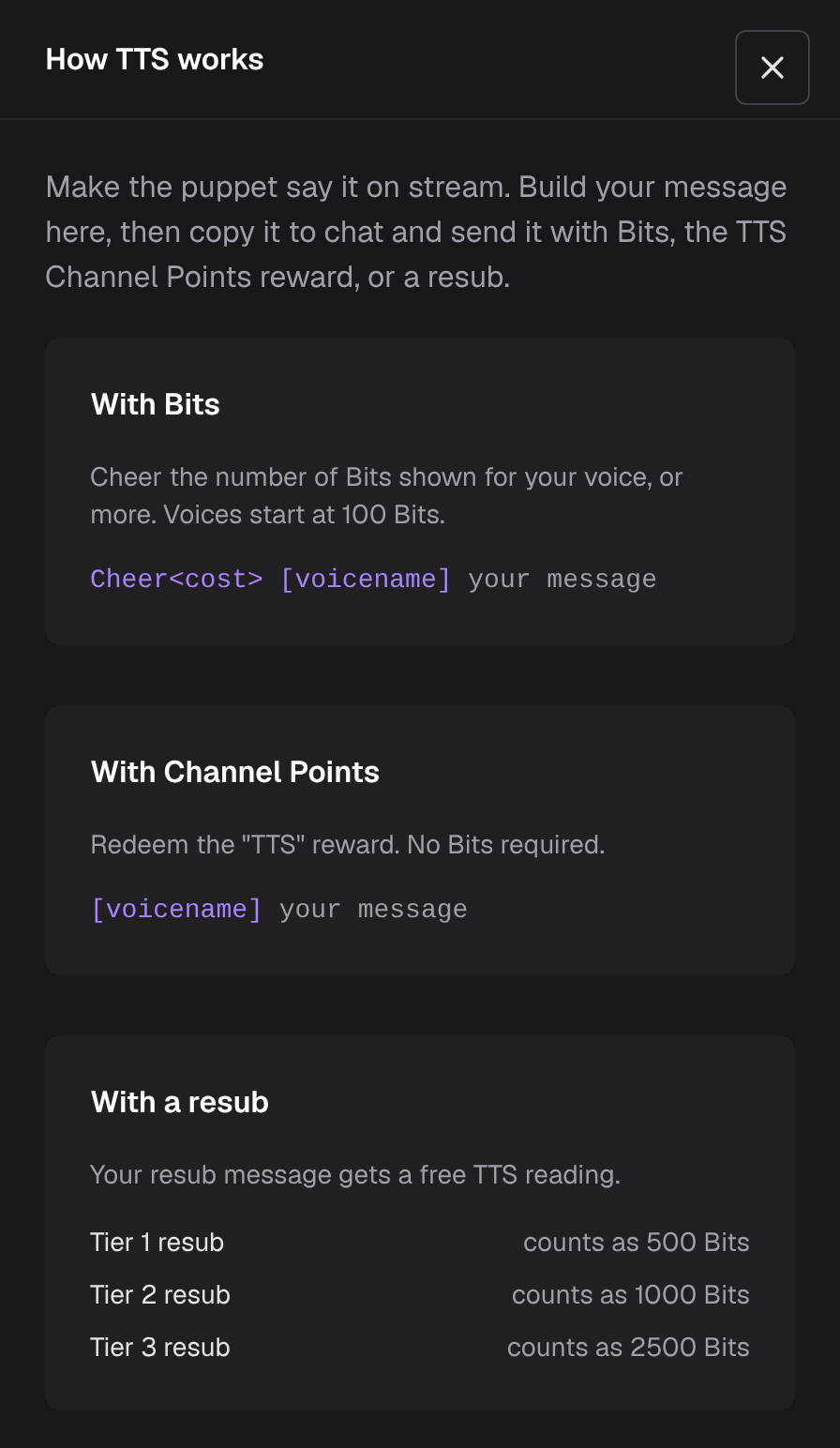
This example comes from KokoNuts’ channel. Another broadcaster can use different limits.
Channel Points rewards
VoicePuppet uses the TTS reward selected by the broadcaster. It does not read every Channel Points redemption as TTS. When a message cannot play, the selected TTS reward can be refunded automatically.
Custom Power-ups
A custom Power-up needs viewer text so there is a message to speak. The broadcaster creates the Power-up on Twitch and enables it in VoicePuppet. More than one Power-up can be enabled.
A 1,000-Bit Power-up gives the same voice access as a 1,000-Bit Cheer. It does not make every voice available. Voice prices and the channel’s message limits still apply.
Keep messages under control
The way a message is sent does not replace moderation. Read TTS moderation for screening and queue controls.
Troubleshooting
The message copied, but nothing played
Copy message prepares text for Twitch. It does not submit a Cheer, redeem a reward or send a resub message. Paste and submit the message through the matching Twitch feature, then check whether it is waiting for moderation.
A voice is unavailable for this way to send
Voice access can change with your Bits amount, the selected TTS reward or your subscription tier. Check Send with and choose an available voice before sending. A voice available for a Cheer may not be available for Channel Points or your resub tier.
A Power-up does not speak
The Power-up must accept viewer text and be enabled in VoicePuppet by the broadcaster. Ask the broadcaster to check both settings.
New to VoicePuppet? Start with the setup overview, or see what streamers get.